
What is an AI agent in Mobitsa
An AI agent in Mobitsa is a configurable assistant that replies to customers in connected channels, uses a knowledge base, and, when needed, performs available actions through skills. In the current product model, it is the central entity around which settings, channels, knowledge, and dialogs are built.
Simply put, it is not just a chat, but a separate assistant in the Mobitsa dashboard. You create it, set up the basic settings, connect channels, enable the needed skills, and then review real customer dialogs.
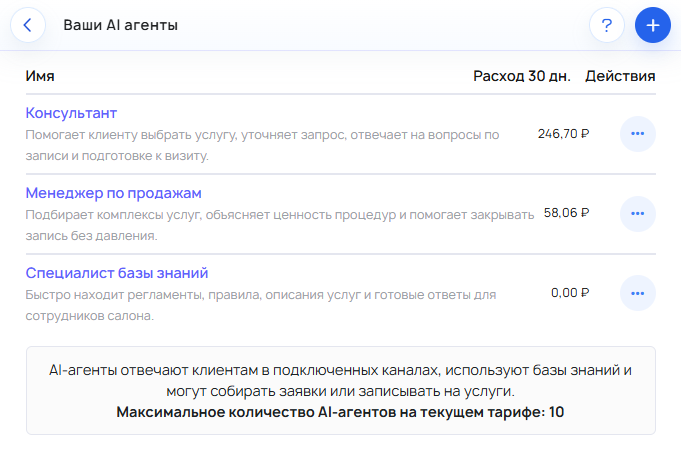
What parts an AI agent consists of
To better understand how it works, it is important to distinguish several entities.
- Agent — the central entity. It has a name, description, language, instructions, communication style, model settings, costs, channels, skills, and related dialogs.
- Channels — determine where the assistant communicates with the customer. For example, it can be a website or Telegram. The same agent can work in several channels if they are connected and supported.
- Skills — define what the assistant can do beyond ordinary answers. In the current model, three main areas are confirmed: lead collection, online booking, and product sales.
- Knowledge base — a source of facts and materials for answers. You can add documents and FAQs to it, and then connect it to a specific agent.
- Dialogs — where you view real conversations with customers. They are needed not only to read the chat, but also to control quality: they show where the assistant lacks knowledge, skills, or more precise instructions.
- Model and costs — settings that affect the agent’s operating cost and help control the budget.
How an AI agent works in general
Usually the basic flow looks like this:
- You create an agent.
- You fill in the basic settings.
- You enable the needed skills.
- You connect at least one channel.
- If needed, you connect a knowledge base.
- You check the model and limits.
- You see how the agent works in real dialogs.
In this form, the AI agent becomes a working tool rather than just a draft in the interface.
What is needed for the first launch
It is important to understand that a created agent is not always ready to work on its own.
For a real launch, you usually need to:
- configure at least one channel;
- connect a knowledge base if you need accurate answers about your terms, services, or rules;
- enable a suitable skill if the assistant should not only answer but also take actions.
The minimum useful start is usually this:
- create an agent;
- set the basic settings;
- connect a channel;
- if needed, enable a skill;
- if needed, connect a knowledge base.
What not to confuse
This is one of the most important things for understanding the product.
- An agent is not a channel. A channel is responsible for where the assistant works: on a website, in Telegram, and so on.
- An agent is not a skill. A skill adds a specific working scenario: a lead, a booking, or product work. Without a skill, the assistant may remain mainly informational.
- An agent is not a knowledge base. A knowledge base provides facts and materials for answers, but it is not an agent by itself.
If you remember this distinction, it will be easier to navigate the settings later:
- agent — the central assistant;
- channel — the place of communication;
- skill — the action it can perform;
- knowledge base — the source of facts for answers;
- dialogs — the place to monitor the result.
When an AI agent is especially useful
An AI agent is useful if you want to:
- answer customers on a website or in a messenger;
- provide answers based on your own materials and FAQs;
- collect leads;
- help with online booking;
- participate in product scenarios;
- monitor real dialogs and gradually improve answer quality.
Important to consider
The AI agents section in the interface may be marked as beta. Also, different channels and scenarios may vary in readiness. If you are just getting started, it is better to first set up a basic scenario: create an agent, connect a channel, and check the first real dialogs.