
How to set up the “Lead Collection” skill
The “Lead Collection” skill helps the AI agent not only answer questions, but also collect a customer inquiry directly in the conversation. This is convenient if you need to receive a lead with contact details and pass it on for further processing. The skill does not replace a CRM: it helps collect data, but does not take over the full handling of the inquiry.
When to use the skill
Add this skill if the AI agent should bring the conversation to a lead.
- collect customer inquiries;
- request contact details;
- clarify several important details about the lead;
- pass the lead along the workflow.
If the agent is needed only to answer questions, you can skip this skill.
What the skill does
After being added, the skill can:
- request the customer’s contact details;
- collect additional fields, if you configured them;
- bring the dialog to lead submission.
After the customer leaves their details, the lead will be sent to CRM → Leads.
By default, the skill already collects the name and phone number. You do not need to add these fields separately. Configure only the fields that are actually needed for your business.
How to add the skill
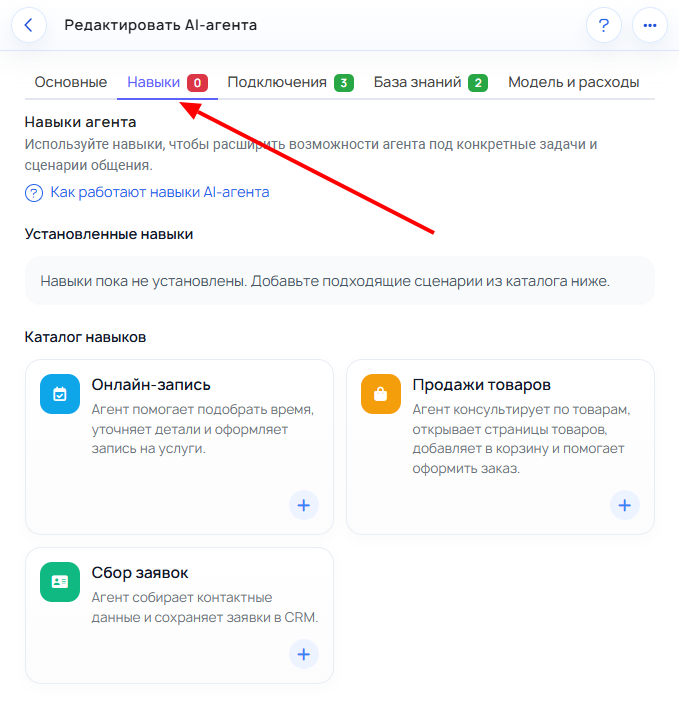
Step 1. Open the “Skills” tab
- Open the required AI agent.
- Go to the Skills tab.
This is where the list of skills available for the agent is located.
Step 2. Find the “Lead Collection” skill and click +
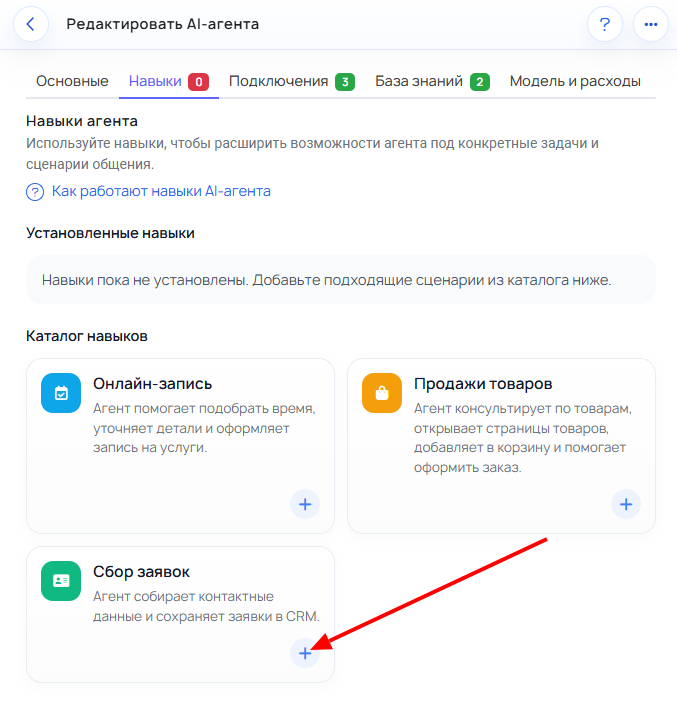
Find the Lead Collection skill in the list and click the + button to add it to the agent.
Step 3. Open the skill settings
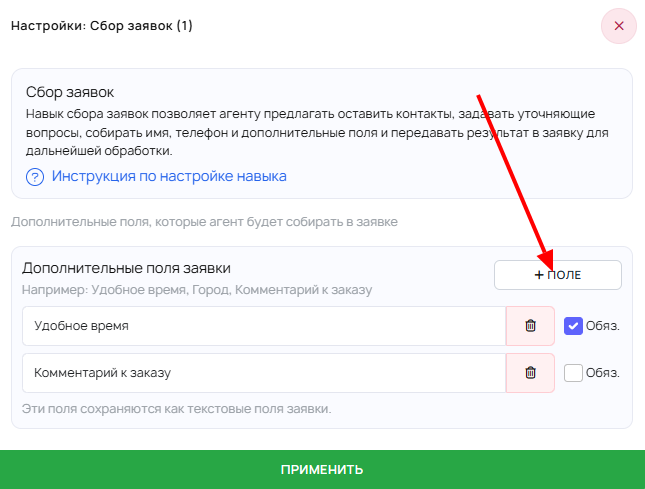
After adding it, open the skill settings. This is where the lead collection logic and additional fields are configured.
Step 4. Add only the additional fields you need
Keep the minimum required set of fields so it is easier for the customer to reach the end of the conversation.
Usually, at the start, it is enough to have:
- the name and phone number collected by the skill itself;
- the inquiry topic;
- 1–2 additional fields, if they are really needed for the next step.
Step 5. Carefully set field requirements and save the changes
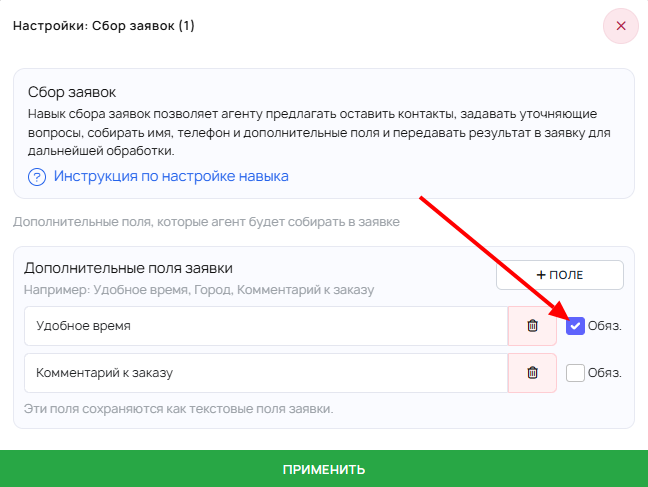
Do not make almost all fields mandatory. Only the data without which the lead cannot be processed should be required.
After configuring, save the changes.
What not to overcomplicate at the start
Do not add extra fields “just in case” if:
- they do not affect further lead processing;
- they can be clarified later;
- they overwhelm the customer in the first contact.
The shorter and clearer the flow, the higher the chance the customer will submit a lead.
What to keep in mind about costs
Enable the skill for a specific task. More complex AI agent workflows may slightly increase the cost of its operation. The cost is also affected by the agent model, especially in skills scenarios.
In most cases, it is better to keep only the skills and settings that are actually needed for the job.
How to check that the skill works
- Open the channel where the AI agent works.
- Start a conversation as a customer.
- Ask the agent to help you submit a lead.
- Check whether it requests the name, phone number, and required additional fields.
- Make sure the conversation actually reaches lead submission.
- Check that the new lead appears in CRM → Leads.
Common mistakes
- too many fields added;
- almost all fields made mandatory;
- field names are unclear to the customer;
- data is collected that the business does not use later;
- expecting the skill to replace a full CRM.
What not to confuse it with
The “Lead Collection” skill is not a website form. It works inside the conversation and helps capture an inquiry through dialogue.
The skill also does not replace a CRM. It helps collect a lead, but does not take over all further work with the customer.