
Mobitsa online booking
Turn available time into a clear booking.
A client chooses a service, specialist or resource and sees only available times. You receive the booking in your working calendar with client details, price and statuses.
Start without a website using a standalone public link.
Start your way
A website is optional.
Open the same calendar to clients with a standalone link or embed it into a Mobitsa page.
Public link
Enable a standalone form and share it in messages, social profiles or business listings. No website required.
Quick launch without a websiteWebsite block
Add booking to a page and customize the design and extra fields. The form uses the same calendar as the public link.
A form that belongs to the pageAvailability logic
Clients see time that can actually be booked.
Mobitsa matches service duration and price, specialist schedules, resource occupancy and slot rules.
Combines every selected condition
The booking appears in the calendar
Workspace view
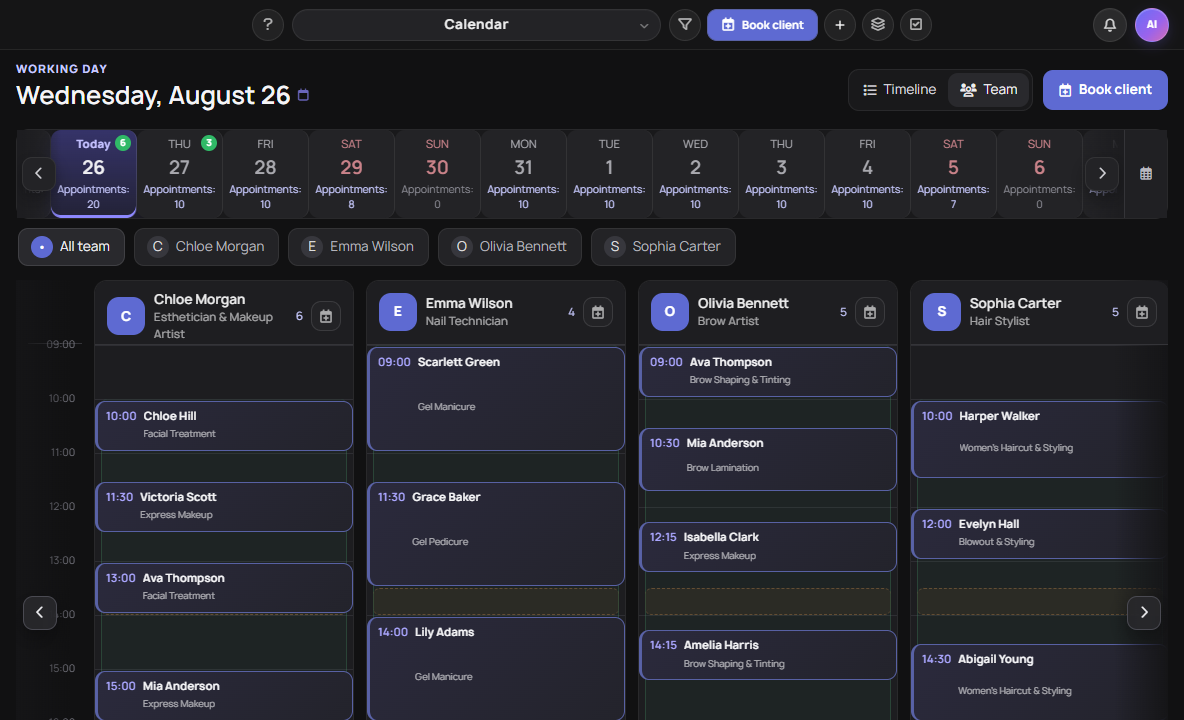
A calendar that shows the whole day.
Date, available time, bookings and team workload remain in one context.
Two modes
Availability adapts to the way you work.
Use a recurring schedule or open only specific dates and intervals.
Manual slots
Add bookable time only where it is available. Ideal for events, consultations and irregular schedules.
Schedule and exceptions
Set working days and hours. A one-off slot takes priority whenever the regular schedule needs an exception.
Exact rules instead of manual checking
Individual rules for each weekday
Unavailable time within a working day
The step used to suggest times
Prevent last-minute bookings
One place or a group format
All, selected or specialist services
Client journey
From choice to booking without unnecessary detours.
The form gathers context step by step and never shows options that are already unavailable.
-
01
Choose a task
The client selects one or several services.
-
02
Who and where
They choose a specialist or resource when needed.
-
03
Date and time
They see intervals that fit the required duration.
-
04
Contact details
They leave their details and additional answers.
-
05
Confirmation
The booking enters the calendar and the client sees a confirmation.
Client view
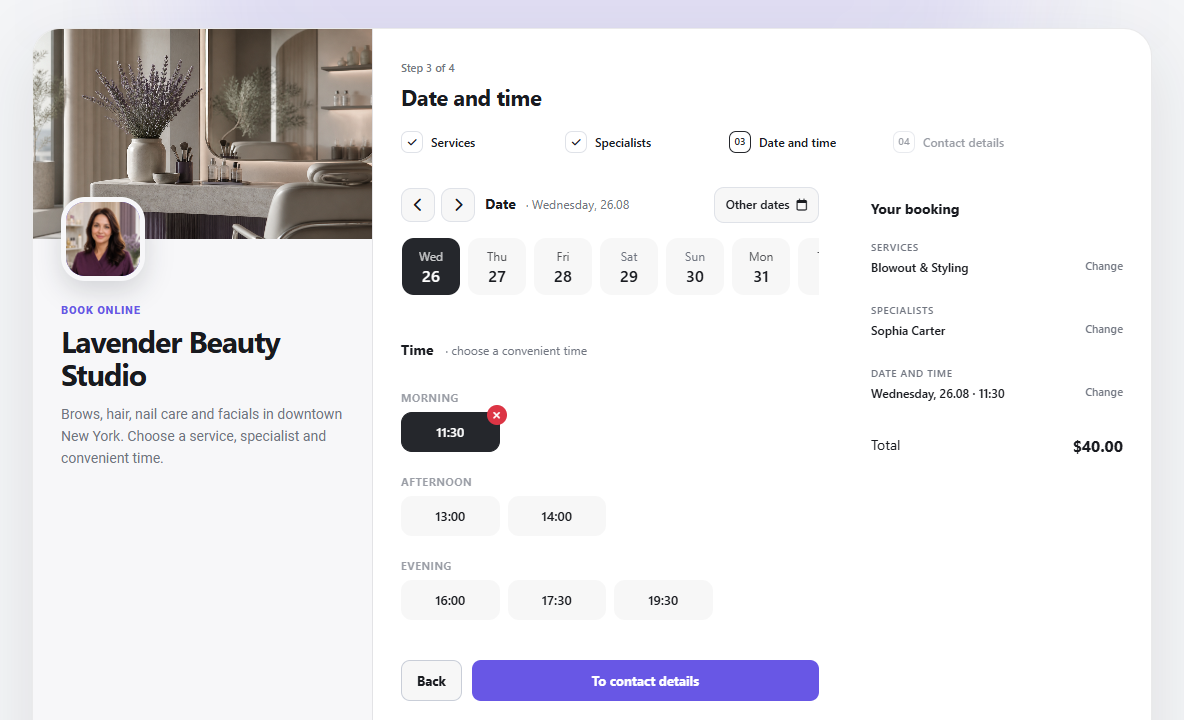
The form guides clients through only the relevant steps.
Clients choose a service, specialist and available time on one clear, sequential page.
After booking
The calendar remains a working tool for your team.
Go beyond collecting requests and manage every visit from creation to completion.
Booking card
Client, services, price, source, specialist and resource stay together.
Visit status
Waiting, arrived, completed, no-show or cancelled.
Visit details
Add internal notes and the information your team needs for the visit.
Team access
Assigned team members work with their own visits in their account.
Visit statusWaiting
Visit details✓ Complete
Booking control
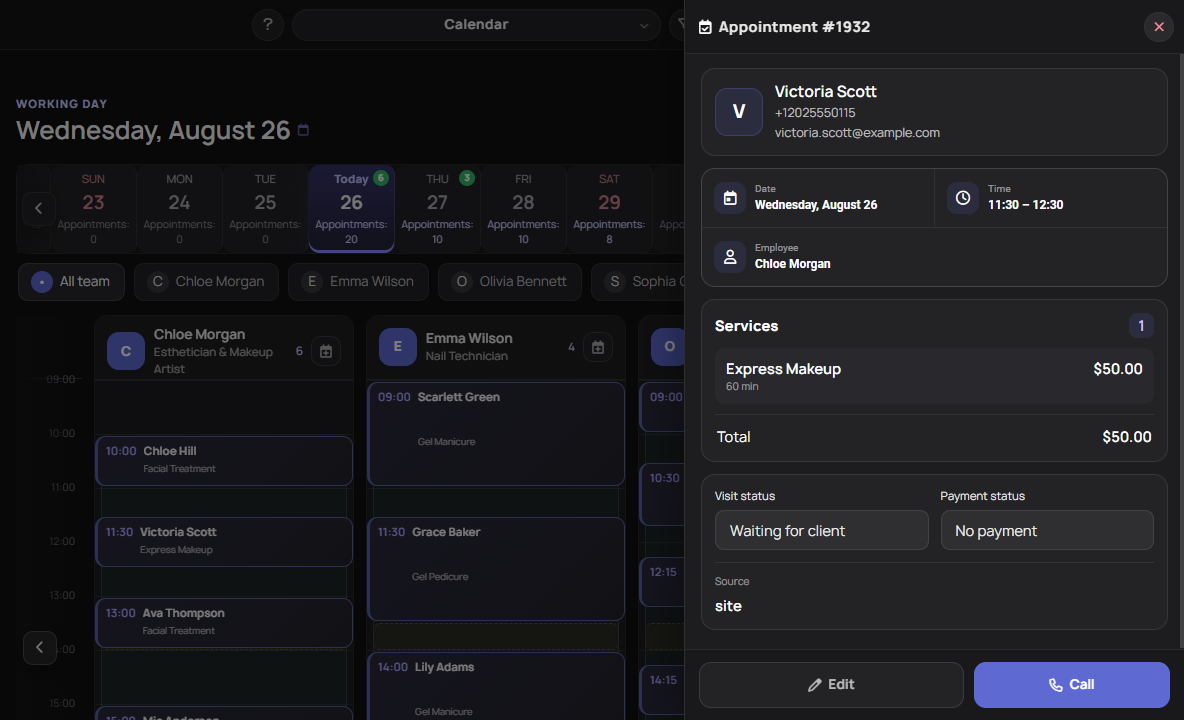
Client and visit details open next to the calendar.
The card keeps services, price, source, specialist, resource and operational statuses.
One working context
Online booking does not stay an isolated form.
It connects to other Mobitsa modules where that helps the business.
CRM and contacts
A booking stores client data and can be linked to a CRM contact.
Website booking form
Embed the form in a page and customize its design and additional fields.
AI chatbot
Connect the booking skill so the chatbot can guide a client toward a suitable time.
Team members
Assignment, time and visit-status changes enter the employee notification workflow.
Sources
Website, public-form and AI-assisted bookings remain distinguishable in the data.
Workspace
Services, team, resources and permissions stay inside the project.
Different operating models
From a solo practice to a team schedule.
The module fits businesses where a client occupies a specialist, place or equipment for a period of time.
Services and consulting
Solo booking without a separate employee entity.
Studios and salons
Specialists, different services and durations.
Classes and groups
Slots with several available places.
Rooms and equipment
Occupancy control for limited resources.
Plans
Start with solo booking. Add a team as you grow.
Online booking is available on paid plans. Prices and limits come from the active Mobitsa plan configuration.
PRO
A public form, calendar and services for an independent specialist.
- 10 services
- No separate employee entity required
- Public link and website block
BUSINESS
Specialists, resources and an expanded multi-project workflow.
- 50 services
- 50 employees
- 50 resources
Questions and answers
The essentials before launch.
Key answers are open by default, with nothing hidden behind accordions.
Do I need a website for online booking?
No. Enable the standalone public form and share its direct link. Use the website block when booking should be part of a page.
Can I work on my own?
Yes. A solo practice does not need a separate employee entity and uses the workspace owner schedule.
How is a specialist different from a resource?
A specialist provides services and has a working schedule. A resource is a limited object such as a room, chair or piece of equipment that cannot be occupied by two bookings at once.
Can I add custom fields to the booking form?
Yes. The website booking block can collect additional client information through custom fields.
How are multiple service durations handled?
Selected service durations add up and the system checks for a continuous interval of the required length.
What can an employee see?
Assigned employees can work with their bookings and update visit statuses and booking details.
Mobitsa · Online booking
Give clients available time and your team one calendar.
Set up services and schedules, publish the link and start accepting bookings.